How Much Does Asana Cost? Plans, Seat Brackets, and the AI Meter
By the SoftSea editorial team
The answer in one table
Asana charges per user, per month, with a discount for annual billing. These are the list prices from asana.com/pricing, checked on November 18, 2026.
Plan
Billed annually, per user/mo
Billed monthly, per user/mo
Who it is for
Personal
$0
$0
One or two people, personal projects
Starter
$10.99
$13.49
Small teams tracking projects and deadlines
Advanced
$24.99
$30.49
Growing teams with portfolios, goals, and capacity planning
Enterprise
Contact sales
Contact sales
Organizations needing SAML, SCIM, and advanced controls
Interactive tool
SaaS Cost Calculator
The per-seat price is the small number. This is the real one: your team, a full year, both billing cycles.
Asana Starter for 10 seats
$1,318.80 per year
Billed annually: $109.90 per month equivalent, paid once a year.
Billed monthly instead: $1,618.80 per year.
Annual billing saves $300.00 a year (19 percent), if you are sure the seats survive the year. Empty seats paid annually are the most common SaaS waste we see.
Bar: annual-billing cost as a share of monthly-billing cost for the same seats.
Plan prices from vendor pricing pages, checked November 18, 2026. Taxes, add-ons, and usage overages are not included, because vendors do not include them in the headline price either.
What a team actually pays
Team size
Starter, per year (annual billing)
Advanced, per year (annual billing)
5 people
$659.40
$1,499.40
10 people
$1,318.80
$2,998.80
25 people
$3,297
$7,497
Monthly billing raises those totals by roughly a fifth: Starter's $13.49 against $10.99 is an 18 percent premium for flexibility, and Advanced's $30.49 against $24.99 is similar. As with every tool in our project management guide for small teams, the tier jump inside Asana costs more than the difference between Asana and its rivals, so the real pricing question is not "Asana or not" but "Starter or Advanced," and that question is answered below by features, not by ambition.
Team totals from 5 to 100 seats, with the monthly billing column beside them
Starter and Advanced both scale linearly on paper, so the honest way to budget is to read your size straight off a full ladder instead of multiplying in a spreadsheet. The annual columns below multiply the vendor checked rates from asana.com/pricing, gathered on November 18, 2026: Starter at $10.99 per user per month billed annually, which is $131.88 per seat per year, and Advanced at $24.99, which is $299.88 per seat per year. The monthly billing columns use $13.49 and $30.49 the same way.
Team size
Starter, annual billing, per year
Starter, monthly billing, per year
Advanced, annual billing, per year
Advanced, monthly billing, per year
5 people
$659.40
$809.40
$1,499.40
$1,829.40
10 people
$1,318.80
$1,618.80
$2,998.80
$3,658.80
25 people
$3,297
$4,047
$7,497
$9,147
50 people
$6,594
$8,094
$14,994
$18,294
100 people
$13,188
$16,188
$29,988
$36,588
Hold two cautions alongside the ladder. The seat bracket section below explains why billed seats can exceed headcount above five users, so treat each row as exact at tidy sizes and as a floor while a block is filling. And the monthly premium, roughly a fifth at every rung, buys genuine flexibility for a team whose size swings with contracts; paying it for three stable years in a row is simply donating the difference.
What each plan actually buys
Personal is free and genuinely capable for an individual: unlimited tasks and projects, list, board, and calendar views, unlimited storage with a 100 MB per-file cap, status updates, and over 100 free integrations. Its limit is people, not features: the plan covers up to 2 users. Treat it as a personal plan and a trial, because for a team of three it does not exist.
Starter at $10.99 is where teams land. It adds the views that make projects manageable (Timeline and Gantt), reporting dashboards, unlimited automations, forms for intake, custom fields and templates, and unlimited free guests, which matters for client work because guests do not consume paid seats. Most small and mid-size teams should start here and stay here longer than Asana's upgrade prompts suggest.
Advanced at $24.99 is about managing many projects at once: unlimited portfolios, goals that connect daily tasks to company objectives, resource management and workload views, approvals and proofing, forms with branching, and native time tracking. If nobody at your company opens a portfolio view, Advanced is a $14 per person per month donation. Buy it when a named person needs portfolios, workload, or time tracking, not as a default.
Enterprise is quote-only and buys administration: SAML single sign-on, SCIM provisioning, service accounts, and audit-grade controls, with an Enterprise+ tier above it for data residency and SIEM integration. If sales has to quote it, your pricing question has left this guide and entered procurement.
The seat bracket trap
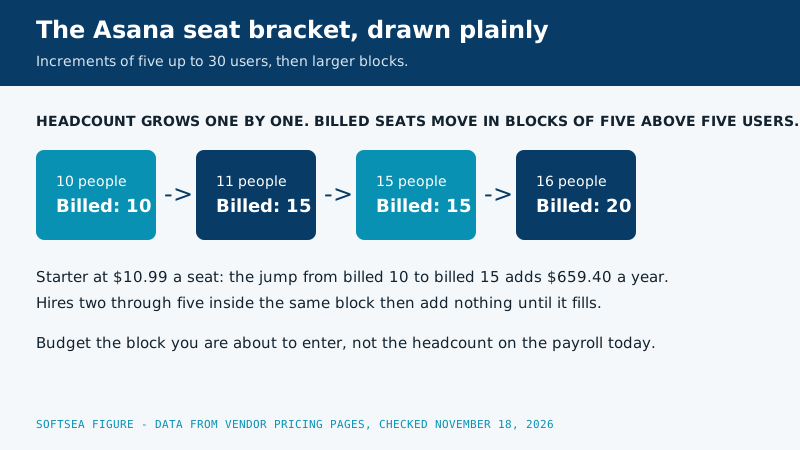
Asana does not sell paid seats one at a time at every size. Paid plans start at 2 seats, sell singly up to 5 users, and then move in blocks: increments of 5 up to 30 users, 10 up to 100, and larger blocks beyond. The practical consequence lands on growing teams: the hire who takes you from 10 to 11 seats can move your billed count to the next block, so the marginal cost of one person is several seats until the block fills. This is not hidden, but it is not on the pricing page's headline either, and it means the table above is exact only at block boundaries. When you budget a growing team, budget the block you are about to enter, not the headcount you have today, and time big hiring pushes to just after a renewal rather than just before.
The second meter: AI requests and credits
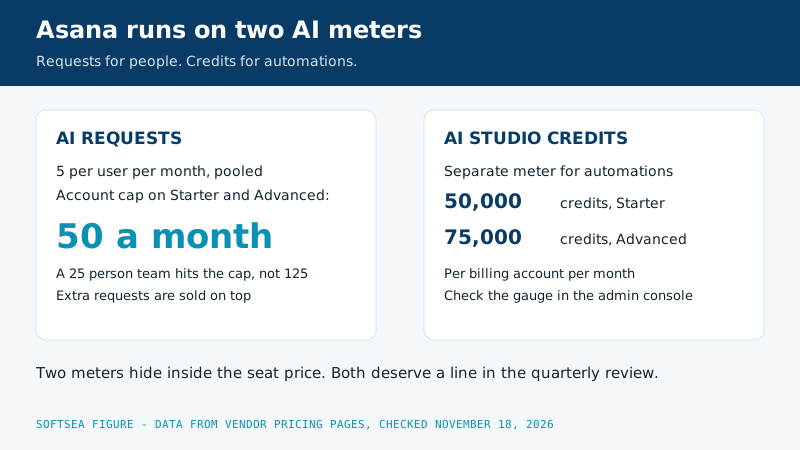
Asana's seat price is no longer the whole price of using Asana's headline features. Paid plans include AI Teammates and Asana Dash with an allowance of 5 AI requests per user per month, pooled across the account and capped at 50 requests per account on Starter and Advanced (250 on Enterprise), with extra requests sold prepaid or pay-as-you-go. AI Studio, the automation builder, runs on a separate credit meter: 50,000 credits per billing account per month on Starter, 75,000 on Advanced. For most teams these allowances are enough that the meter never appears. For a team that builds its workflows on Asana's AI, the meter is a second subscription hiding inside the first, and it deserves a line in the budget review next to the seat count. Check your usage in the admin console quarterly; metered features have a way of becoming load-bearing while nobody is watching the gauge.
Diagram of the Asana seat bracket: ten people billed as ten seats, eleven people billed as fifteen, fifteen billed as fifteen, and sixteen billed as twenty
The bracket trap, worked month by month
Follow one agency through a growth year and the bracket stops being an abstraction. In January the agency has 10 people on Starter, billed as 10 seats, paying $1,318.80 for the year on annual billing. In March it hires an eleventh coordinator. Headcount rises by one, but billed seats jump to the next block of 15, so the annualized cost becomes $1,978.20. That single hire carries a $659.40 price tag in Asana terms, five seats worth of money, and the finance lead who budgeted one seat at $131.88 feels ambushed even though the vendor published the bracket rules all along.
April through August are the quiet months of the block. Hires twelve, thirteen, fourteen, and fifteen each add real salary and zero additional Asana cost, because the block bought in March had empty chairs waiting. The sixteenth hire, in September, triggers the next jump, to a billed count of 20 and an annualized $2,637.60. Averaged across the whole year, the agency paid about $164.85 per actual person for a tool whose headline rate is $131.88 per seat, and the entire difference is bracket timing rather than dishonesty.
Three habits tame this. Ask the checkout screen or the sales rep for the billed seat count, in writing, before any purchase or renewal. Cluster start dates just after a renewal when you know a hiring round is coming, so a block jump buys a full year at the new size. And when a block jump lands mid year, fill it deliberately: the empty seats are already paid for, so contractors and part timers who would otherwise wait for access may as well be invited in.
Diagram of the two Asana AI meters: AI requests pooled at five per user per month with a fifty request account cap on Starter and Advanced, and AI Studio credits at fifty thousand on Starter and seventy five thousand on Advanced
The AI meter, counted for a real team
The pooled allowance deserves arithmetic, because the cap changes its meaning completely. Take a 25 person company on Starter. Five requests per user per month pools to 125 on a naive reading. The account cap on paid self serve tiers is 50 requests per month, so the pool the company can actually spend is 50, which works out to two requests per person if it were shared evenly. It never is shared evenly. In practice a handful of coordinators and managers burn most of it on status summaries and draft updates during the first fortnight, and the meter reads empty while most of the team has never touched the feature.
Now give that company an AI heavy workflow: ten power users who each want fifteen requests a month for meeting follow ups, project briefings, and inbox triage. Demand is 150 requests, supply is 50, and the shortfall of 100 requests a month is a purchase, either prepaid in packs or pay as you go, that belongs in the budget beside the seat line. The point is not that the meter is unfair; allowances are stated in the vendor material our data set draws from. The point is that a team adopting AI features as infrastructure must track a consumption number that seat based budgeting was never designed to show.
AI Studio runs on its own gauge, and it rewards a different kind of attention. Starter includes 50,000 credits per billing account per month and Advanced includes 75,000, and automated workflows draw the balance down each time they run. A single cheerful automation that fires on every task change across a busy workspace can consume credits at a pace nobody predicted from a demo with twelve tasks. Build one workflow, watch its draw for a full month in the admin console, and only then roll the pattern out across projects. Quarterly, put both gauges on the same review page as the seat count: requests spent against the cap, credits spent against the allowance, and any extra purchases itemized. Metered features become load bearing quietly, and the review is how you notice before the invoice explains it to you.
Where Asana sits against its rivals on price
Context helps, because $10.99 is neither cheap nor expensive until it stands next to the alternatives, all checked on the same day. Trello Standard undercuts everyone at $5 per user per month billed annually, and Trello Premium matches Notion Plus at $10. ClickUp Core comes in at $9, a dollar under Asana Starter, with more features and more setup. Asana Starter at $10.99 is the premium end of the mainstream tier, and what the premium buys is polish and structure: the cleanest timeline and dashboard experience of the group, and an upgrade path to portfolios that Trello cannot offer at any price. Advanced at $24.99, meanwhile, competes with Airtable's Business tier territory rather than with boards, and should be compared against portfolio tools, not task tools. The fair conclusion is that Asana prices like the structured option it is: never the cheapest way to track tasks, and reasonably priced for teams whose actual cost is the coordination chaos it removes. If the chaos is not yours, the cheaper tools in our Trello alternatives guide will serve you better, and Asana's free Personal plan will tell you within a week whether its structure fits how your team thinks.
Prices and plan shapes only settle a decision when you can lay the rivals side by side and poke at the numbers yourself. The builder below starts with Asana next to ClickUp and Trello, the two alternatives our readers weigh most often, and every figure inside it comes from the same vendor checked data set as the tables above.
Interactive tool
Comparison Builder
Pick two or three products and see them side by side on the numbers that decide the purchase.
Measure
Asana
ClickUp
Trello
Starting paid price
$10.99 per user/mo, billed annually
$9 per user/mo, billed annually
$5 per user/mo, billed annually
Free option
Free plan: Personal, for up to 2 users, unlimited tasks and projects
small teams with deadlines, cross-functional projects, client work with guests
teams replacing several tools, budget-conscious growing teams, ops teams that live in dashboards
simple visual workflows, very small teams, personal projects shared with a few people
Strengths
Timeline and Gantt views on the entry paid tier; Unlimited free guests on paid plans; Strong reporting dashboards
Most features per dollar in the category; Docs and goals included, not add-ons; Generous free plan on seats
Fastest setup in the category; Butler automation built in; Cheapest paid entry of the major boards
Watch out for
Free plan caps at 2 users, so it is not a team plan; Paid seats are sold in brackets above 5 users; AI features are metered (5 requests per user per month, pooled)
Free plan storage is only 60 MB; Setup and customization take real time; Can feel heavy for simple work
No native reporting or dependencies; Free plan stops at 10 collaborators and 10 boards per Workspace; Timeline and dashboard views need Premium
Lowest entry price: Trello at $5 per user/mo billed annually. Real free plan: Asana, ClickUp, Trello. Entry price is the floor, not the decision: check the plan line above for the tier that actually includes the feature you need.
All figures from vendor pricing pages, checked November 18, 2026. Some vendors price by contacts, tasks, or operations instead of seats; those notes are in the plan data and the linked pricing guides.
How to keep the bill down
Stay on Starter until a named feature of Advanced (portfolios, workload, time tracking, goals) has a named owner who needs it.
Use free guests for clients and contractors instead of paid seats; Starter and above include unlimited guests.
Pay annually once the team is stable; the discount is about 18 percent against monthly billing.
Watch the seat blocks when hiring: enter the next block deliberately, ideally right after renewal.
Audit the AI meters quarterly, and set a spend cap on extra AI requests before a busy month sets it for you.
A worked example: a 12-person agency
Make the bracket trap concrete. A 12-person agency on Starter pays for its seats in blocks, so its billed count may sit at the top of a block rather than at exactly 12; at the pure list rate, 12 seats on annual billing come to $1,582.56 a year. The agency grows to 16 people mid-year. On a naive per-seat reading, four hires should add about $527 a year. In bracket world, the billed count can jump to the next block boundary, so the invoice rises by more than four seats' worth until the block fills, and the last hire in the block is effectively free. None of this is a reason to avoid Asana; every enterprise-ish tool plays some version of this game, and Asana at least publishes its seat prices openly, which is more than several rivals in our data set manage. It is a reason to do two things: ask sales or the checkout screen for the billed seat count, not the headcount, before you commit, and schedule the team's growth spurts just after a renewal date, when a block jump buys you a full year at the new size instead of a prorated surprise in month nine.
Related guides
Before you commit, it is worth a look at the nearest alternatives and comparisons, gathered below from the same section of the chart.
Yes, with a hard limit: the Personal plan is free forever and includes unlimited tasks and projects, but it covers up to 2 users. For an individual or a pair, it is a complete tool. For a team, it is a trial with better manners, and the first paid step is Starter at $10.99 per user per month billed annually.
How much does Asana cost for a team of 10?
On Starter with annual billing, $1,318.80 per year. On Advanced, $2,998.80 per year. On monthly billing those become $1,618.80 and $3,658.80 respectively. Remember the seat brackets: those figures assume your billed seat count is exactly 10, and Asana sells in blocks above 5 users, so confirm the billed count at checkout.
What is the difference between Asana Starter and Advanced?
Starter runs projects: timelines, dashboards, automations, forms, and custom fields. Advanced manages a portfolio of projects: goals, unlimited portfolios, workload and resource management, approvals, and native time tracking, plus a larger AI Studio credit allowance. Teams running a handful of projects need Starter. Organizations coordinating departments need Advanced. The $14 per user gap means guessing wrong for 25 people costs $4,200 a year.
Does Asana charge for guests?
No. Paid plans include unlimited free guests, who can collaborate on the projects they are invited to without consuming a paid seat. This is one of Asana's genuine pricing virtues for agencies and client work, and it contrasts with tools that bill outside collaborators as members. Members, the people on your own team with full access, are what you pay for.
How many AI requests does a 25 person team actually get each month?
Fifty, not one hundred and twenty five. The allowance is five requests per user per month pooled across the account, but Starter and Advanced cap the pool at fifty requests per account, so any team larger than ten people is governed by the cap rather than the per user figure. Enterprise raises the cap to two hundred and fifty. Extra requests beyond the pool are sold prepaid or pay as you go, which is why the meter deserves a quarterly check in the admin console.
Does Asana offer discounts?
The standing discount is annual billing, worth about 18 percent against monthly rates. Beyond that, pricing is negotiated at the Enterprise tier. There is no published per-seat sale price for Starter or Advanced, and the prices in this guide are the list prices from Asana's own pricing page, checked November 18, 2026, which is the number to budget from.