Trello Alternatives, Sorted by the Ceiling You Just Hit
By the SoftSea editorial team
First, name the ceiling
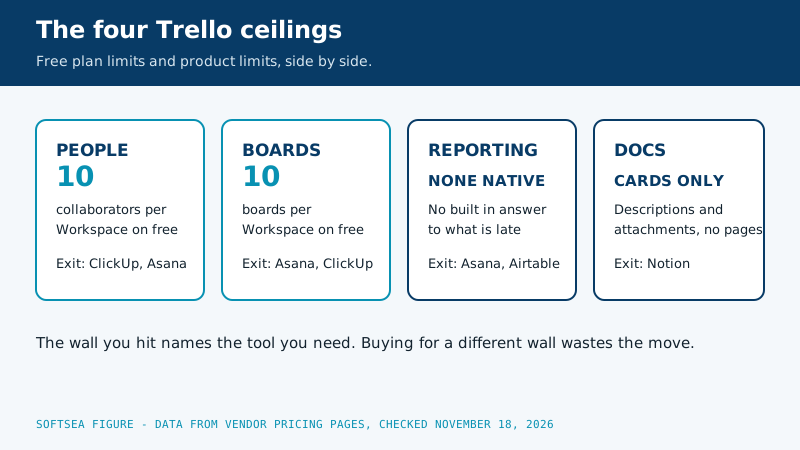
Nobody leaves Trello because it is bad. They leave because they hit one of its built-in ceilings, and each ceiling points to a different replacement. The free plan stops at 10 collaborators per Workspace and 10 boards per Workspace. Paid Trello still has no native reporting worth the name, no dependencies between cards, and automation that depends on Butler rules and Power-Ups. Roundups that list twenty alternatives without asking which wall you hit are wasting your time, so this guide is organized by ceiling first and products second. Prices were checked on vendor pricing pages on November 18, 2026.
The ceiling you hit
What it looks like
Go to
People: the eleventh collaborator
A new hire cannot join the free Workspace
ClickUp (unlimited members on free) or Asana
Boards: the eleventh board
Projects multiply, the Workspace will not
Asana or ClickUp, where projects are not the scarce resource
Reporting: "show me everything late"
Status meetings exist because the tool cannot answer
Asana (dashboards) or Airtable (views over data)
Structure: dependencies and deadlines
Cards block each other and nobody can see it
Asana or ClickUp with timeline views
Docs: cards cannot hold the context
Every card links out to documents elsewhere
Notion
Simplicity ceiling in reverse: Trello felt heavy
You want less tool, not more
Todoist
Interactive tool
Comparison Builder
Pick two or three products and see them side by side on the numbers that decide the purchase.
Free plan: Personal, for up to 2 users, unlimited tasks and projects
Free plan: unlimited blocks for individuals; limited blocks for teams, 5 MB file uploads, 10 guests
Plans
Free Forever: free · Core: $9/user/mo annual · Business: $17/user/mo annual · Enterprise: not published
Personal: free · Starter: $10.99/user/mo annual · Advanced: $24.99/user/mo annual · Enterprise: not published
Free: free · Plus: $10/user/mo annual · Business: $20/user/mo annual · Enterprise: not published
Platforms
Web
Web, Windows, macOS, iOS, Android
Web
Best for
teams replacing several tools, budget-conscious growing teams, ops teams that live in dashboards
small teams with deadlines, cross-functional projects, client work with guests
documentation-heavy teams, personal knowledge bases, startups that want one workspace
Strengths
Most features per dollar in the category; Docs and goals included, not add-ons; Generous free plan on seats
Timeline and Gantt views on the entry paid tier; Unlimited free guests on paid plans; Strong reporting dashboards
Unmatched flexibility for docs and wikis; Plus is free for students and educators with a school email (1 member, vendor FAQ); Databases turn pages into trackers
Watch out for
Free plan storage is only 60 MB; Setup and customization take real time; Can feel heavy for simple work
Free plan caps at 2 users, so it is not a team plan; Paid seats are sold in brackets above 5 users; AI features are metered (5 requests per user per month, pooled)
You design the system yourself, and maintain it; Full AI requires the Business plan; Weak as a strict project management tool
Lowest entry price: ClickUp at $9 per user/mo billed annually. Real free plan: ClickUp, Asana, Notion. Entry price is the floor, not the decision: check the plan line above for the tier that actually includes the feature you need.
All figures from vendor pricing pages, checked November 18, 2026. Some vendors price by contacts, tasks, or operations instead of seats; those notes are in the plan data and the linked pricing guides.
Diagram of the four Trello ceilings: ten collaborators per Workspace, ten boards per Workspace, no native reporting, and cards that cannot hold documents, each with its matching exit
If you hit the people or boards ceiling: ClickUp
ClickUp's Free Forever plan allows unlimited tasks and unlimited members, which removes the two Trello free-plan walls in one move. Its storage cap, 60 MB, is the new wall to watch, and the paid tiers (Core at $9 per user per month billed annually, Business at $17) remove it while adding the views, dashboards, and integrations that make ClickUp an everything app. Choose ClickUp when the team is growing and the budget is not, and when someone will own the setup: ClickUp's flexibility is its cost as well as its benefit, because a workspace with no structure decided in advance becomes a pile of lists. Teams that set up spaces and folders on day one get the best deal in this category. Teams that improvise get a mess with more features in it.
If you hit the reporting or structure ceiling: Asana
Asana is the natural landing spot when the complaint is visibility. Starter at $10.99 per user per month billed annually ($13.49 monthly) brings Timeline and Gantt views, reporting dashboards, forms, custom fields, and unlimited automations, so "what is late, whose is it, and what does it block" becomes a screen instead of a meeting. Advanced at $24.99 ($30.49 monthly) adds portfolios and workload for teams running many projects at once. Two warnings travel with Asana: its free Personal plan covers only 2 users, so there is no free team tier to grow into, and paid seats are sold in brackets above five users. Our Asana pricing breakdown does that math in full. Choose Asana when the work has hand-offs and deadlines and the board stopped being enough, which is the most common Trello exit of all.
If you hit the docs ceiling: Notion
Some teams discover their cards were really documents in disguise: briefs, specs, research, and decisions with a status attached. Notion is the home for that work. Pages and databases replace cards and lists, the same information shows as a table, board, or calendar, and Plus at $10 per user per month billed annually ($12 monthly) covers most small teams. The free plan gives an individual unlimited blocks, so one person can prototype the whole system before the team commits. The honest cost is maintenance: Notion gives you a construction kit, not a building, and a workspace nobody owns decays. Our Notion vs Trello comparison walks the model difference in detail, and it is the right read before choosing this direction, because migrating back is the expensive version of this decision.
If Trello was already too much: Todoist
Not every Trello exit is upward. If the board felt like ceremony and the team really keeps a shared list, Todoist Business at $8 per user per month billed annually is the cheapest respectable landing spot here: fast task entry, shared projects, reminders, and none of the platform weight. You give up boards as the center of the universe, timelines, and reporting, and you get back a tool nobody has to be trained on. Solo users and pairs often discover this was the tool they wanted all along.
If your boards were really data: Airtable
When a Trello board groans under hundreds of cards with the same fields, the work was a database pretending to be a board. Airtable is the honest version: records with real fields, viewed as a grid, a Kanban board, a calendar, or a gallery, with automations and interfaces on top. Team costs $20 per user per month billed annually and Business $45, so it is the priciest option in this guide, and worth it exactly when the data matters more than the flow: content operations, inventories, pipelines, and anything you currently export to a spreadsheet to analyze. If you never export your boards, you do not need Airtable.
And monday.com, with a caveat
monday.com appears in every Trello alternatives list for good reason: it is the most visual of the full platforms, and teams that found Trello plain often love it. Its free plan covers individuals, and paid plans start at a 3-user minimum. The caveat is ours to state plainly: when we checked monday.com/pricing on November 18, 2026, its per-seat prices were not exposed in readable form, so this guide does not quote them. Shortlist it, by all means, and get the number in the trial flow before you migrate a team on the strength of a review site's figure, including ours for any other tool: the vendor page is the only price that counts. The full side-by-side of the structured options is in our small team project management guide.
Migration checklist: leaving Trello without losing the thread
Export each board you actually use (JSON or CSV on paid plans) and archive the rest inside Trello rather than migrating dead work.
Write down the three questions your new tool must answer on day one, for example "everything late," "Ana's workload," "what ships this week."
Build one project in the new tool and run it for two weeks alongside Trello before moving the rest.
Recreate your two or three hardest-working Butler rules as automations in the new tool and test them on real cards.
Move people last: migrate the work, invite the team, and set a date after which Trello is read-only.
Keep the Trello workspace archived for one quarter. The card you need always turns up in week nine.
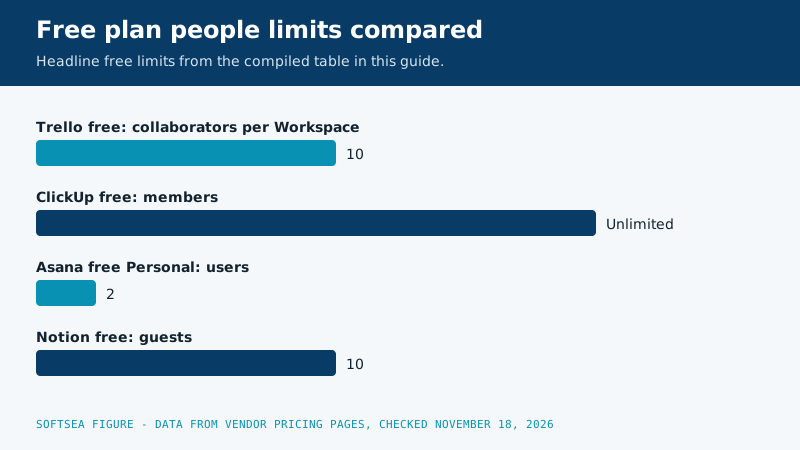
Bar chart comparing free plan people limits: Trello allows ten collaborators per Workspace, ClickUp allows unlimited members, Asana Personal allows two users, and Notion allows ten guests
Trello free limits against every alternative, in one table
Ceilings only hurt when the next tool has a lower one hiding somewhere else. This table compiles the free plan limits and entry prices from our vendor checked product data, gathered from the pricing pages themselves on November 18, 2026, so you can see which wall each alternative removes and which new wall it installs.
Tool
Free people limit
Free container limit
Other free cap that matters
Entry paid tier, per user per month billed annually
Trello
10 collaborators per Workspace
10 boards per Workspace
Unlimited cards and lists
Standard, $5
ClickUp
Unlimited members
Unlimited tasks
Storage capped at 60 MB
Core, $9
Asana
2 users on Personal
Unlimited tasks and projects
A team of three has no free tier at all
Starter, $10.99
Notion
Built for one person, 10 guests
Unlimited blocks for individuals, limited for teams
File uploads capped at 5 MB
Plus, $10
Todoist
One person on Beginner
5 personal projects
Team features wait for Business
Business, $8; Pro is $5 flat for individuals
Airtable
Aimed at individuals and small teams starting out
Bases and records carry their own starter limits
Real value starts on paid tiers
Team, $20
The pattern to carry away is that every free plan rations something, and the rationed resource is the vendor's upgrade lever. Trello rations people and boards. ClickUp rations storage and polish. Asana rations people so tightly that its free plan is a personal tool. Notion rations team blocks and file size. Choosing an alternative without naming which ration you can live with is how a team escapes one ceiling and files a complaint about another within a month.
The automation ceiling, examined closely
Butler is genuinely good at board shaped automation: move a card when a label lands, assign a member when a card enters a list, fire a checklist every Monday morning. The ceiling appears when a rule needs to look beyond one board, wait on a condition in another system, or branch on the contents of a field. Asana answers with unlimited automations on Starter, rules that span projects, and forms that create structured work at intake. ClickUp answers with automations woven into its everything model, where a task change can update docs, goals, and dashboards that share the workspace. Neither answer is free of cost: both demand that someone design the rule set deliberately, because an automation nobody owns eventually files, notifies, or closes something important at the worst possible moment. Migrate your two hardest working Butler rules first, test them on live work for a fortnight, and only then build the rest.
The reporting ceiling, examined closely
Reporting is the ceiling that disguises itself as a meeting problem. When the board cannot answer what is overdue, who is overloaded, and which project is drifting, the team schedules a status meeting and answers by hand, every week, forever. Price that meeting honestly: eight people in a room for thirty minutes, forty eight weeks a year, is 192 person hours spent recreating a dashboard. Asana Starter includes reporting dashboards that answer the overdue and ownership questions directly. Airtable answers a different reporting need, the analytical one, by letting the same records roll up into views a spreadsheet would envy. ClickUp dashboards sit between the two. Any of them pays for itself the first quarter it deletes a recurring meeting, which is why reporting exits are the least regretted migrations in this guide.
Three worked exits, with the bills attached
A nine person support team adds a tenth and eleventh collaborator in the same month and hits the people ceiling head on. Moving to ClickUp free costs nothing and removes the headcount wall, but the team uploads screenshots and logs all day, so the 60 MB storage cap makes Core the realistic landing spot: eleven seats at $9 per user per month billed annually total $1,188 a year, still cheaper than the meeting heavy alternative of staying small on purpose.
A fifteen person product team keeps missing cross project deadlines because cards cannot block each other. Its exit is Asana Starter at fifteen seats, which is $1,978.20 a year on annual billing, buying timelines, dependencies, and dashboards in one move. The team should budget the seat bracket effect described in our Asana pricing guide before signing, because Asana sells seats in blocks above five users and the sixteenth hire will not cost what the fifteenth did.
An eight person research group discovers its cards are really briefs and literature notes with a status attached. Its exit is Notion Plus at eight seats, $960 a year on annual billing, trading board purity for pages that can hold the actual substance of the work. The group keeps one Trello board for conference deadlines out of habit for a full quarter, then quietly stops opening it, which is how docs ceiling exits usually end.
Work through the export steps on screen with the tracker below; it follows the checklist in the migration section and adds the Trello specific jobs, like preserving Butler rules on paper before they vanish.
Interactive tool
Trello Export and Migration Checklist
Check off each step as you finish it. Your progress stays on this page.
0 of 9 complete
0% done
Related guides
Readers working through this choice usually weigh the options below next. Each one runs the same vendor checked pricing as this guide.
ClickUp, on paper: unlimited members and tasks on the free plan removes Trello's two free ceilings. In practice, watch the 60 MB storage cap, and consider that Trello's own free plan (10 collaborators, 10 boards per Workspace) is enough for many teams to simply stay. The best free alternative is sometimes the tool you are already on, on the plan you have not tried.
Which Trello alternative is most similar to Trello?
monday.com and ClickUp both lead with boards that will feel familiar on day one, and Asana includes a board view beside its list and timeline. Notion can imitate a board with a database view but feels different in daily use. If the team's only complaint is a ceiling, pick the tool whose board feels like home and whose paid tier removes that ceiling.
Is Asana better than Trello for a growing team?
Usually, yes: Asana adds the timelines, dashboards, and dependencies that growing teams ask for, at $10.99 per user per month billed annually for Starter. The cost is a real free-plan cliff (2 users) and a more structured way of working that some teams experience as overhead. Our Notion vs Trello comparison covers the simplicity trade from the other side.
Can I import my Trello boards into these tools?
Most of these tools offer Trello importers or accept CSV, and cards arrive as tasks with their titles, descriptions, members, and due dates largely intact. What never imports is the workflow design: lists become statuses or sections that need renaming, and automations must be rebuilt. Budget an hour per active board for cleanup, and migrate one board first to learn your tool's quirks.
Will my Butler automations move to the new tool with my boards?
No. Importers carry cards, lists, members, and dates, but Butler rules are written in a Trello specific format that no rival reads. Write down each rule in plain language before you export, rebuild the two or three that carry real weight inside the new tool during your pilot fortnight, and let the rest lapse. Teams regularly find that a third of their rules were automating habits the new tool makes unnecessary.
When should a team stay on Trello?
When the work is a simple flow, the team is under the free limits or happily on Standard at $5 per user per month, and nobody is asking questions the board cannot answer. Trello's simplicity is a feature that alternatives charge you to replace with complexity. Leave when a ceiling costs you time every week, not when a review tells you a rival has more features.