Notion Alternatives, Chosen by Which Notion Job You Actually Use
By the SoftSea editorial team
The question every other guide skips
Notion is not one tool. It is four tools wearing one coat: a notes app, a team wiki, a database builder, and a project tracker. People search for a Notion alternative for one of four reasons, and each reason has a different right answer. You might be leaving because the per-seat price climbed, because the AI you wanted sits in the $20 Business plan, because your notes live on someone else's server and you want them back, or because you only ever used one of the four jobs and a specialist tool does it better. Name your reason first. The shortlist below is organized by job, and prices were checked on vendor pages on November 18, 2026.
Which Notion job you actually use
The specialist that beats it
Starting paid price
Tasks and projects
ClickUp or Asana
ClickUp Core, $9 per user/mo billed annually
Databases and structured data
Airtable
Team, $20 per user/mo billed annually
Personal notes you want to own
Obsidian or Anytype (local-first)
The apps themselves are free
A team wiki that maintains itself
A dedicated wiki tool, or staying on Notion
Varies; see the wiki section
A bit of everything, cheaper
ClickUp
Free plan with unlimited tasks
Interactive tool
Comparison Builder
Pick two or three products and see them side by side on the numbers that decide the purchase.
Free plan: for individuals and small teams getting started
Free plan: Personal, for up to 2 users, unlimited tasks and projects
Plans
Free Forever: free · Core: $9/user/mo annual · Business: $17/user/mo annual · Enterprise: not published
Free: free · Team: $20/user/mo annual · Business: $45/user/mo annual · Enterprise Scale: not published
Personal: free · Starter: $10.99/user/mo annual · Advanced: $24.99/user/mo annual · Enterprise: not published
Platforms
Web
Web
Web, Windows, macOS, iOS, Android
Best for
teams replacing several tools, budget-conscious growing teams, ops teams that live in dashboards
content operations, inventories and pipelines, data-heavy workflows
small teams with deadlines, cross-functional projects, client work with guests
Strengths
Most features per dollar in the category; Docs and goals included, not add-ons; Generous free plan on seats
Relational data without a database admin; Many views over the same records; Strong automations and interfaces
Timeline and Gantt views on the entry paid tier; Unlimited free guests on paid plans; Strong reporting dashboards
Watch out for
Free plan storage is only 60 MB; Setup and customization take real time; Can feel heavy for simple work
Pricier per seat than task tools; Overkill for simple to-do lists; Costs grow with seats even for light users
Free plan caps at 2 users, so it is not a team plan; Paid seats are sold in brackets above 5 users; AI features are metered (5 requests per user per month, pooled)
Lowest entry price: ClickUp at $9 per user/mo billed annually. Real free plan: ClickUp, Airtable, Asana. Entry price is the floor, not the decision: check the plan line above for the tier that actually includes the feature you need.
All figures from vendor pricing pages, checked November 18, 2026. Some vendors price by contacts, tasks, or operations instead of seats; those notes are in the plan data and the linked pricing guides.
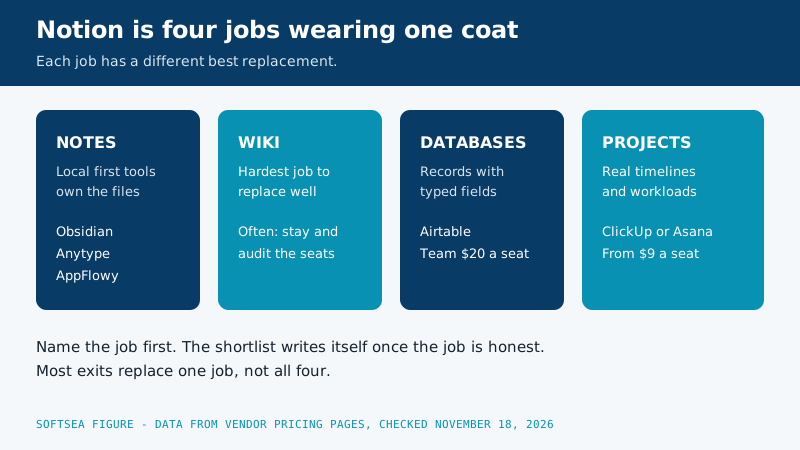
Diagram of the four jobs inside Notion: notes served by local first tools, the wiki as the hardest job to replace, databases served by Airtable, and projects served by ClickUp or Asana
If you used Notion for tasks and projects: ClickUp or Asana
This is the most common exit, because Notion's project tracking is a database pretending to be a project tool: no real dependencies, no workload view, and automations that stop where project management starts. ClickUp replaces it with tasks, docs, goals, and dashboards in one workspace, with a Free Forever plan (unlimited tasks, 60 MB storage) and Core at $9 per user per month billed annually. It is the closest thing to Notion's everything ambition with actual project machinery inside, and the setup burden is similar: someone still has to design the workspace.
Asana is the other direction: less flexible, more opinionated, and better at the project job specifically. Starter at $10.99 per user per month billed annually ($13.49 monthly) brings timelines, dashboards, forms, and unlimited automations. Pick Asana when the team is done designing its own systems and wants the structure decided for them. Pick ClickUp when the docs-next-to-tasks feel of Notion is what you are trying to keep. Both are compared in depth in our small team project management guide.
If you used Notion for databases: Airtable
Notion databases are charming until the data matters: relations are fiddly, rollups are limited, and the moment someone exports to a spreadsheet to do real analysis, the database has failed. Airtable is the honest version of the same idea: records with typed fields, linked records that behave, and grid, Kanban, calendar, and gallery views over the same data, plus interfaces and automations on top. Team costs $20 per user per month billed annually and Business $45, which is real money next to Notion Plus at $10, so this move only pays when the data is the work: content operations, inventories, applicant or client pipelines, anything with hundreds of records that other tools read from. If your databases hold meeting notes and reading lists, Airtable is a sports car bought for the school run.
If you used Notion for notes and want them back: the local-first tools
A whole family of alternatives exists for one reason: your pages live on your own device, as files you own, instead of on Notion's servers. Obsidian is the best known: your notes are plain Markdown files in a folder you choose, the app is free for personal and commercial use, and paid extras like its official sync service are optional rather than rent. Anytype takes the same local-first idea with encryption and shared spaces. AppFlowy rebuilds the Notion-style block editor and databases as open source you can self-host.
We do not quote prices for these tools beyond what is stated here, because their pricing models (free app, optional services) do not map onto the per-seat table above, and two of them are as much a philosophy as a product. What matters for the decision: local-first tools are superb for personal knowledge and poor at casual team collaboration, they ask more of you technically, and your notes will outlive any company. If the sentence "my notes should be files on my disk" makes you nod, this family is your answer and no cloud tool will satisfy you. If it makes you shrug, stay in the cloud sections.
If you used Notion as a team wiki: think twice
The wiki is the job Notion does best and the hardest to replace, because the replacement has to beat the combination of easy editing, permissions, and search your team already knows. Dedicated wiki tools exist and some add genuinely useful tricks, like flagging pages that have gone stale. But be honest about the migration math: a wiki's value is its accumulated pages and the team's habit of looking there, and both reset to zero on moving day. Unless the wiki is small, young, or actively failing, the strongest Notion alternative for wiki users is often Notion itself, renegotiated: audit who actually needs a paid seat, remember that guests are free, and check whether the Business plan's AI is the real bill you are trying to escape. Plus at $10 per user per month billed annually, with full AI held back for Business at $20, is the pricing fact that drives most wiki exits; our Notion vs Trello comparison shows what the page model is worth when it is working.
The personal exit: Todoist and a notebook's worth of honesty
If your Notion was really a personal task list with aspirations, the alternative is not another workspace. Todoist (Pro at $5 per month billed yearly for individuals, Business at $8 per user per month billed annually) handles the tasks faster than Notion ever will, and a notes app you already own handles the rest. Plenty of Notion refugees discover their system was 90 percent to-do list and 10 percent databases they built once and never opened. Leaving for a smaller tool is not a downgrade; it is an accurate measurement.
Migration checklist: leaving Notion without breaking your links
Export the workspace (Markdown and CSV) before you cancel anything, and keep the export even if the importer works.
List the databases that other pages link to; those are your load-bearing walls and they migrate first.
Expect attachments and embeds to need manual attention; budget an hour per heavily linked database.
Rebuild the three views your team actually opens, not the fourteen you designed once.
Run both systems for two weeks, with new work in the new tool and Notion read-only for reference.
Tell the team the date Notion becomes an archive, and keep it readable for a quarter.
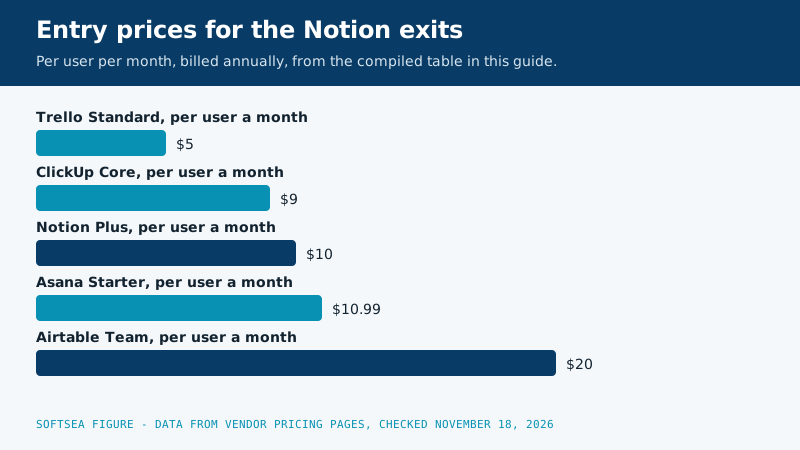
Bar chart of entry paid prices per user per month on annual billing: Trello Standard 5 dollars, ClickUp Core 9 dollars, Notion Plus 10 dollars, Asana Starter 10.99 dollars, and Airtable Team 20 dollars
Every serious alternative on one price table
Shortlists get easier when the money sits in a single view. This table compiles the cloud tools named in this guide from the per seat figures in our product data, gathered from each vendor's own pricing page on November 18, 2026. Local first tools are absent on purpose: a free app with optional services cannot be honest in a per seat column.
Tool
Free plan in one line
Entry paid tier, per user per month billed annually
Higher tier worth knowing
Where it wins against Notion
Notion itself
Unlimited blocks for individuals, 10 guests
Plus, $10
Business, $20 with full AI included
The benchmark every exit is measured against
ClickUp
Unlimited tasks, 60 MB storage
Core, $9
Business, $17
Project machinery Notion only imitates
Asana
Personal plan for up to 2 users
Starter, $10.99
Advanced, $24.99
Structure decided for you, timelines and dashboards
Airtable
For individuals and small teams getting started
Team, $20
Business, $45
Records and relations that behave like a real database
Todoist
Beginner plan with 5 personal projects
Business, $8
Pro is $5 a month flat for one person
Pure task speed for the personal exit
Trello
10 collaborators and 10 boards per Workspace
Standard, $5
Premium, $10
A board with zero design work, for board shaped work
Two patterns matter more than any single row. The spread between the cheapest and dearest entry tier is four to one, yet the tools cluster tightly between $8 and $11 for mainstream team work, which means price alone rarely decides a Notion exit. And the free plans differ in kind, not just in size: ClickUp limits storage, Asana limits people, Notion limits team blocks, and Trello limits boards, so the free tier you can actually live on depends on which resource your team burns fastest.
Leaving over price: run the seat audit before you run the export
The most common price exit is not really about the sticker. It is about paying Business rates for a team that mostly needs Plus, or paying member rates for people who only ever read two pages. Before pricing any alternative, count three groups in your current workspace: people who edit weekly and truly need seats, people who comment or review and may fit guest access, and people who have not opened Notion in a quarter and need nothing at all. In a typical 18 seat workspace that audit finds roughly five dormant seats and four read only collaborators, which turns an apparent $4,320 a year Business bill into a $2,160 Plus bill for nine real editors with guests riding free. That is a larger saving than any tool switch on the table above delivers, and it costs an afternoon rather than a migration.
Work the comparison honestly for a 12 person team that stays put after auditing. Twelve Plus seats on annual billing cost $1,440 a year. Twelve Business seats cost $2,880. The $1,440 gap is the true price of full Notion AI for that team, and it should be judged as an AI purchase, not as a workspace purchase. If three people use the AI daily, the same money buys them a great deal of drafting help. If nobody can name the last AI output that survived editing, the gap is pure waste and the alternative you needed was a cheaper tier of the tool you already own.
Leaving over AI tiers: what the higher rung actually buys
Notion folded its full AI into the Business plan, and that single packaging choice manufactures a steady stream of alternative searches. The honest question is which AI work you do inside the workspace: summarizing meeting pages, drafting first versions of routine documents, and querying your own wiki in plain language. Those jobs are real, and for a documentation heavy team they can justify the tier. What the tier does not buy is judgment about your customers, your codebase, or your market, and it does not remove the editing pass. Teams that leave over this tier usually split the job instead: keep the workspace on Plus, and give the two or three heavy writers a standalone AI subscription they control. That pattern costs a fraction of a workspace wide upgrade and survives the next packaging change, whatever it is.
Leaving for ownership: the offline reality check
Local first tools promise that your notes are files on your disk, readable without an account, a subscription, or a company surviving. That promise is genuine, and for personal knowledge it is close to priceless. The costs arrive elsewhere, and a flagship decision should name them plainly. Sharing a page with a colleague becomes a deliberate act instead of a link. Phones and laptops stay in step only through a sync service you choose and sometimes pay for. Databases, linked views, and permissions are thinner than the cloud tools you are leaving, because files on a disk do not naturally behave like a hosted application. None of that argues against the move. It argues for making it with open eyes: ownership exits succeed when the notes are truly personal, and they sour when a team discovers it wanted a shared workspace with better manners rather than a filing cabinet with better ethics.
Three worked exits, with the bills attached
A doctoral researcher holds 400 notes, two literature databases, and a thesis outline in Notion, and shares almost nothing. Her correct exit is a local first notes app at zero recurring cost, a weekend spent importing and cleaning links, and a backup habit she controls herself. Paying any per seat price to solve an ownership worry would be buying the wrong medicine.
A six person agency uses Notion as a project tracker with client guests, and its real pains are missed deadlines and invisible workload. Its correct exit is Asana Starter: six seats at $10.99 per user per month billed annually come to $791.28 a year, guests stay free, and timelines plus dashboards answer the questions the agency was holding meetings to ask. ClickUp Core would cost $648 a year for the same six seats and remains the pick if the agency wants docs living beside tasks badly enough to own the setup work.
A solo consultant runs a personal task list, a reading database, and a page of client notes. His correct exit is the smallest one in this guide: Todoist Pro at $5 a month billed yearly for the tasks, and the notes app already on his machines for the rest, for a total software spend lower than one month of the Notion bill he was resenting. The lesson generalizes: measure what fraction of your Notion is one simple job wearing a workspace costume, because that fraction decides whether your alternative is a platform or a pocket tool.
The checklist below turns the migration section of this guide into something you can work through on screen, in order, without losing attachments or links on the way out.
Interactive tool
Notion Export and Migration Checklist
Check off each step as you finish it. Your progress stays on this page.
0 of 9 complete
0% done
Related guides
More from this corner of the chart: these companion guides compare the nearest alternatives and head to head matchups.
For teams, ClickUp: it keeps the everything-in-one-workspace idea, adds real project management, and its free plan is generous on tasks and members. For individuals who want to own their notes, Obsidian. The word "overall" hides the real question, which is which of Notion's four jobs you are replacing; the table at the top of this guide is the honest answer.
Is there a free alternative to Notion?
Yes, several. ClickUp's free plan covers unlimited tasks with a 60 MB storage cap. Obsidian is free for personal and commercial use, with optional paid services. Notion's own free plan remains strong for individuals, with unlimited blocks for a solo workspace, so the cheapest alternative is sometimes removing the teammates and seats you do not need from the Notion you already have.
Why do people leave Notion?
Four reasons dominate: the per-seat price as teams grow, full AI sitting in the $20 Business plan when Plus at $10 would otherwise do, the desire to own notes as local files instead of renting cloud pages, and the discovery that one specialist job (projects, databases, or tasks) outgrew the generalist tool. Each reason has a different correct destination, which is why this guide refuses to name one winner.
Can I import my Notion pages into these tools?
Mostly, yes: Notion exports to Markdown and CSV, ClickUp and others offer Notion importers, and Obsidian has an importer that preserves a good deal of structure. Databases arrive as tables that need their field types and views rebuilt, and internal links are the most fragile part. Export everything first, migrate the load-bearing databases by hand, and treat the importer as a starting point rather than a finished move.
How long does a Notion migration usually take for a small team?
Plan on one focused day to export, import, and rebuild the load bearing databases, then two weeks of running both systems while links and habits move over. Wikis take longer than task systems because their value is accumulated cross references, and each broken internal link is a small tax on trust in the new home. Teams that skip the overlap period save a week and pay it back over a quarter in hunting for missing pages.
Should a student pay for a Notion alternative?
Almost certainly not. Notion Plus is free for students and educators with a school email address (a one-member plan, per Notion's own pricing FAQ), and the free tiers of everything in this guide cover coursework. Our guide to AI tools for students builds a full study stack at zero cost; software subscriptions are the last thing a student budget needs.