Notion vs Trello: Pages or Cards, Priced at 5, 15, and 30 Seats
By the SoftSea editorial team
The quick answer
Pick Trello if your work is a flow of tasks that moves through stages and you want a board running today. Pick Notion if your work produces documents, notes, and knowledge that tasks hang off, and someone on the team will own the system. Pick both if your team genuinely does both jobs and accepts two homes for work. Pick neither if your real problem is that work is scattered across chat, email, and files, because neither tool fixes scattering by itself. Prices below were checked on the vendors' pricing pages on November 18, 2026.
This comparison is not close on features, because the products are not the same kind of thing. Notion treats every screen as a page you design. Trello treats every screen as a board of cards you move. That single difference decides everything else: what the tool is good at, what it will never do well, and what your team will spend its time maintaining.
Interactive tool
Comparison Builder
Pick two or three products and see them side by side on the numbers that decide the purchase.
Measure
Notion
Trello
ClickUp
Starting paid price
$10 per user/mo, billed annually
$5 per user/mo, billed annually
$9 per user/mo, billed annually
Free option
Free plan: unlimited blocks for individuals; limited blocks for teams, 5 MB file uploads, 10 guests
Free plan: up to 10 collaborators per Workspace and 10 boards per Workspace
Free Forever: free · Core: $9/user/mo annual · Business: $17/user/mo annual · Enterprise: not published
Platforms
Web
Web, iOS, Android
Web
Best for
documentation-heavy teams, personal knowledge bases, startups that want one workspace
simple visual workflows, very small teams, personal projects shared with a few people
teams replacing several tools, budget-conscious growing teams, ops teams that live in dashboards
Strengths
Unmatched flexibility for docs and wikis; Plus is free for students and educators with a school email (1 member, vendor FAQ); Databases turn pages into trackers
Fastest setup in the category; Butler automation built in; Cheapest paid entry of the major boards
Most features per dollar in the category; Docs and goals included, not add-ons; Generous free plan on seats
Watch out for
You design the system yourself, and maintain it; Full AI requires the Business plan; Weak as a strict project management tool
No native reporting or dependencies; Free plan stops at 10 collaborators and 10 boards per Workspace; Timeline and dashboard views need Premium
Free plan storage is only 60 MB; Setup and customization take real time; Can feel heavy for simple work
Lowest entry price: Trello at $5 per user/mo billed annually. Real free plan: Notion, Trello, ClickUp. Entry price is the floor, not the decision: check the plan line above for the tier that actually includes the feature you need.
All figures from vendor pricing pages, checked November 18, 2026. Some vendors price by contacts, tasks, or operations instead of seats; those notes are in the plan data and the linked pricing guides.
The core difference: the page versus the card
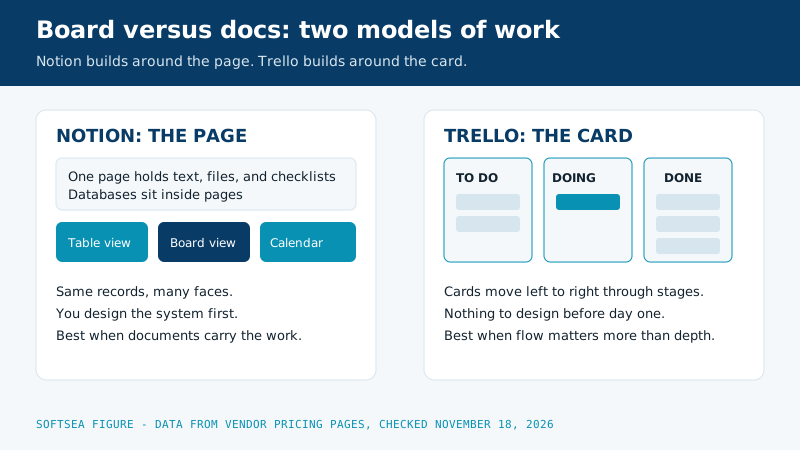
In Notion, the unit of work is the page. A page can hold text, checklists, images, and embedded databases, and a database can be viewed as a table, a board, a calendar, or a gallery. One set of underlying information wears many faces, which is why Notion can become a wiki, a CRM, a content calendar, and a task tracker in the same workspace. The cost of that power is design work: until someone builds the databases and templates, a new Notion workspace is an empty room.
In Trello, the unit of work is the card. Cards live in lists, lists live on boards, and the board is the whole universe. A card holds a title, a description, members, labels, due dates, checklists, and attachments, and it moves left to right as work progresses. There is nothing to design, which is why a team can be productive in Trello before lunch. The cost of that simplicity is a ceiling: a card cannot become a document, a database, or a report.
Side by side
Measure
Notion
Trello
Built around
The page: docs and databases
The card: Kanban boards
Best at
Knowledge bases, wikis, docs that carry tasks
Visual task tracking with simple flows
Views
Table, board, timeline, calendar, gallery over one database
Board first; timeline, table, calendar, and dashboard on Premium
Automation
Database automations and buttons on paid plans
Butler rules, buttons, and scheduled commands
AI
Notion AI, full version on the Business plan
Atlassian Intelligence on paid tiers
Free plan
Unlimited blocks for individuals; limited blocks for teams, 5 MB uploads, 10 guests
10 collaborators and 10 boards per Workspace, unlimited cards
Paid entry
Plus, $10 per user/mo billed annually
Standard, $5 per user/mo billed annually
Learning curve
Days to design, ongoing upkeep
Minutes
Diagram comparing the Notion page model, where one database wears table, board, and calendar views, with the Trello card model, where cards move through board stages
Views and depth
Notion wins on depth of information. A project database can show the same work as a planning table, a status board, and a deadline calendar, and properties like owner, priority, and effort are real fields you can filter and roll up. If your team asks questions of its data ("show me everything Ana owns that is due this month across all projects"), Notion can answer and Trello cannot.
Trello wins on depth of flow. Moving cards is the product, and everything about the board, from card aging to list limits on Premium, is tuned to show work in motion. If your team's question is "where is this stuck," the board answers at a glance. Notion can imitate a board with a database view, but the imitation is heavier to maintain and slower to scan.
Automation and AI
Trello's Butler is the better automation for board work: rules that move cards, assign members, and post checklists when triggers fire, plus scheduled commands like a Monday morning reset. It is included on paid plans and needs no code. Notion's automations work at the database level, updating properties and sending notifications, and suit information workflows more than flow workflows.
On AI, the products diverge in price as much as in kind. Notion has folded its AI into the Business plan at $20 per user per month billed annually, so a team on Plus at $10 that wants full AI doubles its seat price. Trello includes Atlassian Intelligence features on its paid tiers, with writing help and summaries inside cards. Neither AI writes your project updates well enough to skip reading them, but Notion's is the more capable and the more expensive.
The free plans, head to head
Both free plans are real, but they are generous in opposite directions. Notion's free plan is built for one person: unlimited blocks for an individual workspace, with limits that arrive when a team shares it, including limited blocks for multi-member workspaces, 5 MB file uploads, and up to 10 guests. A solo user can run a serious personal system on it indefinitely. Trello's free plan is built for a small group: up to 10 collaborators per Workspace and 10 boards per Workspace, with unlimited cards and lists. A five-person team can run its actual work on it until the board count or the headcount crosses ten. So the free-plan question is really the product question in miniature. If the user is one person building a knowledge base, Notion free wins outright. If the users are a team moving tasks, Trello free wins outright. Neither free plan is a stingy trial; both are the vendors betting that the limits you eventually hit are the ones their paid tiers remove, and in both cases the bet is well aimed.
Pricing and the seat math
Team size
Trello Standard
Trello Premium
Notion Plus
Notion Business
5 seats, one year
$300
$600
$600
$1,200
15 seats, one year
$900
$1,800
$1,800
$3,600
30 seats, one year
$1,800
$3,600
$3,600
$7,200
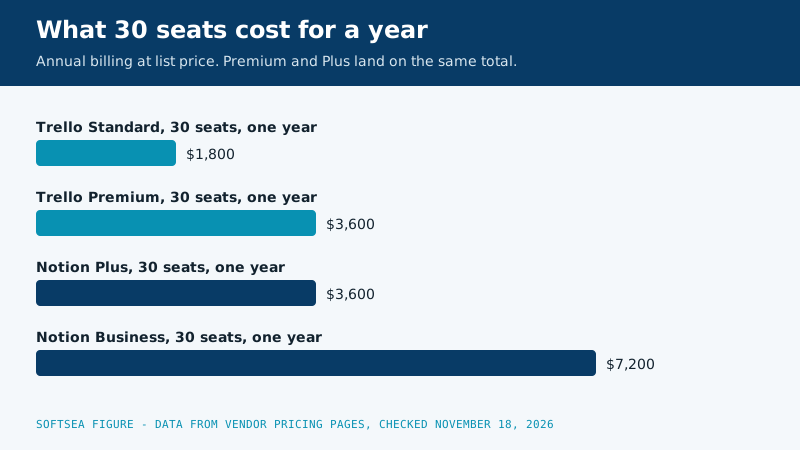
Annual billing at list prices checked November 18, 2026: Trello Standard $5 per user per month ($6 monthly), Premium $10 ($12.50 monthly); Notion Plus $10 ($12 monthly), Business $20 billed annually. The pattern to notice: Trello Premium and Notion Plus cost the same per seat, so at equal money the question is purely which model fits your work. Notion Business is the outlier; only pay it if the AI and the advanced permissions are the point, not as a default upgrade.
Bar chart of one year totals at 30 seats on annual billing: Trello Standard 1800 dollars, Trello Premium 3600 dollars, Notion Plus 3600 dollars, and Notion Business 7200 dollars
The same seats on monthly billing: the flexibility premium, priced
Annual billing is the number vendors print in large type, so the table above uses it. Plenty of young teams pay monthly on purpose, because headcount swings and a prepaid year for a person who leaves in March is money burned. Here is what that choice costs at the same three sizes, computed from the monthly rates in our product data. Prices in both tables come from vendor pricing pages checked on November 18, 2026, and the calculator below this section runs any other seat count you type into it.
Team size
Trello Standard, monthly billing for a year
Trello Premium, monthly billing for a year
Notion Plus, monthly billing for a year
5 seats
$360
$750
$720
15 seats
$1,080
$2,250
$2,160
30 seats
$2,160
$4,500
$4,320
Read the two tables together and three facts stand out. First, monthly billing adds a fifth to a quarter on top of the annual figure for every plan shown, so flexibility is a real line item rather than a rounding error. Second, the ranking never changes with the billing cycle: Standard stays cheapest, Premium and Plus stay close, and the gap between them stays small enough that billing terms should never drive the product choice. Third, Notion Business has no monthly figure in the verified data set, because the vendor sells that tier on annual terms with full Notion AI included, which is one more sign that Business is a considered purchase rather than a casual upgrade. A sensible pattern for a growing team is to pay monthly for the first quarter while the workflow settles, then switch to annual billing once the seat count has survived two hiring rounds without shrinking.
Interactive tool
SaaS Cost Calculator
The per-seat price is the small number. This is the real one: your team, a full year, both billing cycles.
Notion Plus for 10 seats
$1,200.00 per year
Billed annually: $100.00 per month equivalent, paid once a year.
Billed monthly instead: $1,440.00 per year.
Annual billing saves $240.00 a year (17 percent), if you are sure the seats survive the year. Empty seats paid annually are the most common SaaS waste we see.
Bar: annual-billing cost as a share of monthly-billing cost for the same seats.
Plan prices from vendor pricing pages, checked November 18, 2026. Taxes, add-ons, and usage overages are not included, because vendors do not include them in the headline price either.
Migration in detail: what moves cleanly, what needs rebuilding, and what quietly dies
Migrations between these two tools fail in predictable places, and the failure is rarely the cards or pages themselves. Titles, descriptions, due dates, and attachments travel well in both directions. The design wrapped around them does not travel at all, because each tool stores its workflow logic in a format the other cannot read. Budget your move around the middle column of this table, not around the export button.
Element of your current setup
Moving from Trello to Notion
Moving from Notion to Trello
Work items themselves
Cards become database rows with title, owner, and due date intact
Pages become cards, with properties flattened into the description
Checklists inside an item
Arrive as page content and need manual tidying
Arrive as card checklists fairly cleanly
Attachments and files
Download and re-upload is the reliable path
Same: download, then attach to the new card
Automation rules
Butler rules die; rebuild as database automations
Database automations and buttons die; rebuild as Butler rules
Comments and activity history
Export carries little of it; treat as lost
Same in reverse; screenshot anything load bearing
Links between items
Board links break; database relations must be rebuilt by hand
Linked databases collapse; cross references become pasted links
Views your team lives in
Rebuild board, table, and calendar views over the new database
Rebuild lists to match the old database grouping
A small team should still allow a full working day for the move itself, plus a two week overlap where both tools stay readable. The overlap is not waste. It is how you discover which report, saved view, or quiet automation someone depended on without ever mentioning it. Announce the date the old tool becomes an archive, keep it readable for a quarter, and resist deleting anything until two full reporting cycles have passed without a rescue mission into the old workspace.
Edge cases that flip the decision
Three situations regularly overturn the verdict a team reached from the feature tables. The first is guests. A consultancy that invites clients into its work pays very differently in each tool: Notion allows up to 10 guests on the free plan and treats guests separately from paid members, while Trello counts collaborators against its Workspace limits, so a client heavy practice can hit a Trello ceiling with a staff of six and a roster of twenty clients. Count throats, not staff, before you price either tool.
The second is AI, and it cuts the other way. A team that wants AI summaries and drafting inside its workspace faces a doubling in Notion, from Plus at $10 per user per month billed annually to Business at $20, because full Notion AI lives in the higher tier. In Trello, Atlassian Intelligence features ride along with the paid tiers the team already buys for board views. If AI help inside the tool is the headline requirement, run the Business total for your real seat count before falling in love with the Plus row.
The third is connectivity. Neither product is a true offline tool, and both lean on cached copies when a connection drops: desktop apps keep recent pages or boards visible, edits queue, and conflicts get resolved by whoever syncs last. A field team working from basements, aircraft, or rural sites should test both tools on its worst real connection before committing, because this is the one axis where a brochure answer and a job site answer routinely disagree. If offline capture is the core job, neither finalist in this comparison is the right answer, and a local first notes tool deserves the seat instead.
Two worked examples pull these threads together. An eight person operations team tracking supplier orders lives on flow, invites four client contacts as occasional guests, and never writes long documents: Trello Premium at $960 a year on annual billing serves it completely, and Notion would add design work without adding value. A twenty person content studio runs an editorial calendar, a research archive, and client review pages, with tasks hanging off all three: Notion Plus at $2,400 a year on annual billing is the honest fit, and its Business upgrade to $4,800 only earns its keep if the studio genuinely uses Notion AI on drafts every week rather than admiring it in a demo.
Who should pick which
Pick Trello if your team tracks work that flows: support tickets, applications, content production, hiring stages. Pick Trello if nobody wants to administer a system, if the team includes people who will not learn a flexible tool, or if the board needs to exist today. Pick Notion if your team writes: product specs, research, meeting notes, handbooks, and the tasks that come out of them. Pick Notion if one person enjoys building systems and will keep owning the workspace, because an unowned Notion decays. Run both if docs live in Notion and delivery flows on Trello boards, and accept the discipline of linking cards to pages instead of duplicating content. Pick neither, and look at a structured project tool like Asana or ClickUp from our small team project management guide, if your pain is dependencies, deadlines across projects, and reporting, because neither a page nor a card solves that.
Moving between them
Switching from Trello to Notion means exporting boards and rebuilding them as databases; the cards survive, the workflow design does not, and you should budget a day for a small team. Switching from Notion to Trello is the reverse problem: pages flatten into cards, and the documents that gave tasks their context need a new home, usually the same Notion you were leaving, which is how teams end up running both. The honest advice is to decide which model your work actually is before the first migration, because the second migration is the expensive one. If you are leaving Trello because of its ceilings rather than its model, our Trello alternatives guide is the next read; if you are leaving Notion, see Notion alternatives.
Related guides
This decision rarely stands alone. The guides below cover the closest questions on the chart, each with prices checked on the vendor pages.
Is Notion better than Trello for project management?
For projects that are mostly tasks with deadlines, Trello is the better tool: it is faster to run and harder to misuse. For projects that are mostly information, specs, research, and decisions, with tasks attached, Notion is better. Strict project management with dependencies and portfolios belongs to neither; that is Asana and ClickUp territory.
Can Notion replace Trello completely?
It can imitate Trello with a board view over a database, and many teams do exactly that. What it cannot replace is the zero-setup board: every Notion tracker is a small design project first. If your team loved that Trello needed no design, the imitation will feel like a downgrade even though it is more powerful.
Which is cheaper, Notion or Trello?
Trello Standard at $5 per user per month billed annually is the cheapest serious tier. At the tiers most teams actually compare, Trello Premium and Notion Plus both cost $10 per user per month billed annually. Notion Business at $20 is the expensive option in this comparison, driven by the bundled AI.
Does Trello have documents like Notion?
No. Cards hold descriptions and attachments, and that is the ceiling. Teams that need real documents alongside boards either attach files from a doc tool or run Notion beside Trello, which is a legitimate setup when each tool does the job it is built for.
Which one works better for a solo user?
Notion, for most solo users: the free plan gives an individual unlimited blocks, so a personal knowledge base and task system costs nothing. Trello's free plan is also strong for one person, but its free limits are written for workspaces and teams, and a solo user gets more from Notion's page model.
Can a team run Notion and Trello together without creating chaos?
Yes, provided each tool owns one job and links do the travelling. Docs, specs, and decisions live in Notion; delivery stages live on Trello boards; every card links to its page and every project page links back to its board. Chaos arrives when the same status gets typed into both places, because the two copies drift within a week. Pick one home for status and one home for substance, and the pairing is stable for years.
What happens to our automations if we switch tools later?
They do not transfer, in either direction. Butler rules, scheduled commands, database automations, and template buttons are all written in tool specific formats with no export path between them. Inventory your automations before you migrate, rebuild the three that carry real weight during the overlap period, and let the rest die quietly; most teams discover half their rules were solving problems that no longer exist.